How to read a competitor's app reviews to find your opening

The fastest way to find an opening for a Shopify app is to read the 1, 2, and 3 star reviews of the app you would be competing with. Those reviews are where merchants write down, in their own words, the exact thing the current leader does not do. Sort a competitor's reviews to the critical end, read for patterns instead of one-offs, and the recurring complaint that keeps coming up is your wedge. It is the most honest product research you can get, and it is sitting in public.
Why the 1 to 3 star reviews are the useful ones
Five star reviews mostly tell you the app works. That is good to know, but it does not tell you where to attack. The low ratings do. A merchant who takes the time to write a critical review is a merchant who wanted the product to do something it could not, and was annoyed enough to say so in public, under their store name, where the developer can see it.
That annoyance is the signal. People do not write a paragraph about a minor preference. They write it when a real workflow broke, a promised feature was missing, or the price stung after they were already committed. Those are the three things a new app can be built around.
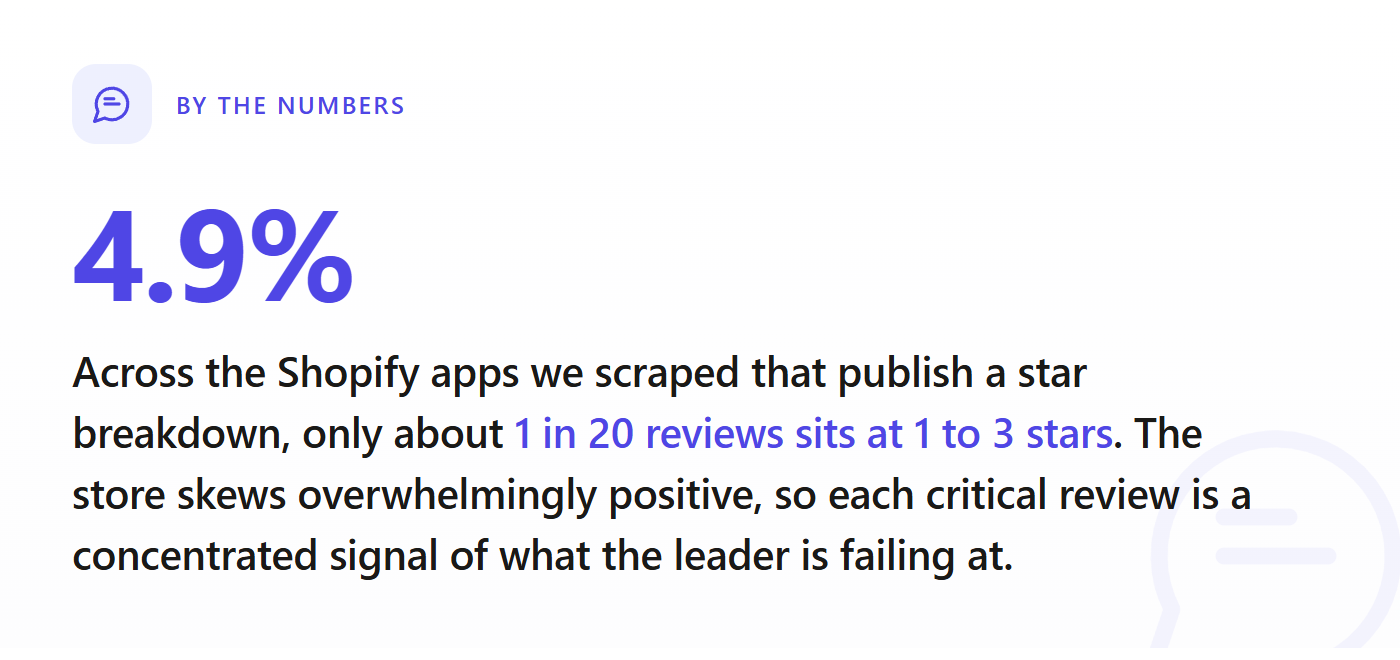
There is a quieter reason these reviews are worth so much: there are not many of them. Across the apps we scraped that publish a star breakdown, only about 5% of all reviews sit at 1 to 3 stars. The store skews overwhelmingly positive, partly because happy merchants get prompted to review and unhappy ones often just uninstall. So the critical reviews that do exist are a filtered, concentrated stream of real unmet need. Do not skim past them. They are the part worth reading slowly.
How to actually read a competitor's reviews
This is a method, not a vibe. Do it the same way every time.
- Open the listing and the full reviews page. On a Shopify App Store listing, scroll to the Reviews section. You will see the overall rating and a star-by-star breakdown (how many 5s, 4s, 3s, 2s, 1s). Click into the low-star counts so you are reading only the critical reviews, not the wall of praise.
- Read the 1, 2, and 3 star reviews top to bottom. Do not cherry-pick. You are pattern matching, and you cannot see a pattern from three reviews.
- Tally the complaints, do not just read them. Keep a running list. Every time a complaint repeats, add a tick next to it. By the end you want a ranked list of "things merchants are angry about," with counts.
- Separate fixable annoyances from structural gaps. A bug the developer will patch next week is noise. A missing capability the app was never designed to have, or a pricing model that punishes a whole segment of merchants, is structural. Structural is where the opening is.
- Repeat across the top three or four competitors. If the same complaint shows up in reviews of every leading app in the category, you have found something the whole category is failing at. That is the strongest signal there is.
A note on dates: sort or skim toward the recent reviews too. A complaint from two years ago may already be fixed. A complaint from last month, repeated, is live.
The four complaints that signal an opening
Not every bad review is an opportunity. These four kinds are.
"It does not do X" (the missing-feature wedge)
The most direct signal. Merchants literally ask for the feature they wish existed. When ten reviewers of an upsell app all say it cannot do post-purchase upsells, or that it does not work with a specific theme or checkout, that is a feature gap with proven demand attached. You are not guessing whether anyone wants it. They told you, by name.
The trap: a single request is not demand. One merchant wanting a niche integration is not a market. Look for the feature that comes up again and again across reviewers who otherwise like the app.
"It broke on my store" (the workflow wedge)
Some complaints are not about missing features but about the app failing on a specific, common setup: a particular theme, a multi-currency store, a high-SKU catalog, a market outside the US. If the same breakage hits a recognizable type of store repeatedly, you can build the app that serves that type of store properly. Narrow and reliable beats broad and flaky.
"It got too expensive" (the pricing wedge)
Read the reviews that mention price, not to undercut blindly, but to find a mispriced segment. A common pattern: an app prices for large stores, and small merchants leave one-star reviews when a usage tier or a per-order fee bites. That is a whole segment the leader is pricing away. A simpler plan aimed at that segment is a real opening. Pricing is one of the clearest things the data shows, and it shows up loudly in reviews.
"Support went silent" (the trust wedge)
Recurring complaints about slow or absent support are not a feature you build, but they are a promise you can make and keep. In a category where the leader is known for ghosting merchants, responsive support is a genuine differentiator that merchants will switch for. It is the cheapest moat to build and the easiest to underrate.
Turning a recurring complaint into a wedge
Finding the complaint is half of it. The other half is judging whether it is worth building around. A complaint is a real wedge when three things are true:
- It recurs. Five, ten, twenty reviewers, not one loud outlier.
- It is structural, not a bug. The leader cannot trivially patch it away, because it conflicts with how their app is built or priced.
- The merchants who complain are a segment you can reach. "Small stores priced out of a fee" is reachable. "One enterprise client with a bespoke need" is not.
When all three line up, you have more than an idea. You have a positioning. Your app is not "another X app." It is "the X app that does the thing every review of the leader complains about." That is a sentence a merchant understands in one read, and it is the difference between getting installs and getting ignored.
This pairs with the rest of the pre-build read. Reviews tell you what to build and how to position it. They do not tell you whether the category is winnable in the first place: how many apps already compete, whether a free first-party Shopify app sits on the throne, whether the leaders are beatable at all. For that, see the most saturated Shopify app categories in 2026, and run the full check in how to validate a Shopify app idea before you write any code before you commit months to a build.
What reviews cannot tell you
Reviews are a map of one app's failures. They are not a map of the whole market. They will not tell you how crowded the category is, how concentrated the reviews are among the top one or two apps, whether the apps in the niche actually charge money, or roughly what it would cost in ads to get noticed. A complaint can be real and the category can still be a closed knife fight you should not enter.
So treat review mining as the qualitative half of the work. It finds the wedge. The market read tells you whether the wedge is worth swinging.
See whether the opening is real before you build
Reading reviews tells you what merchants wish the leader did. The MetricHQ Market Validator tells you whether there is room to be the one that does it. Type in a market and it pulls the live Shopify App Store data to show how crowded the category is, how beatable the current leaders are on rating, whether the apps in it actually charge, and roughly what it would take in ad spend to compete. It is the same scraped dataset behind every store-wide number in this article.
Use the reviews to find the complaint, then run the validator on that category to see if the opening is real. The complaint is your wedge; the data tells you if the door is open.
Found a gap in a competitor's reviews? Check if the category is winnable.
We scraped every app on the Shopify App Store. Check any niche for saturation, demand, and the gaps worth building, in seconds, before you write a line of code.